第16章:ケーススタディ(ごちゃ混ぜ→分離してスッキリ)📚🔥
テーマ:カフェ注文アプリ ☕🧁(CLI版) 「UIに全部😇」から「層+境界+型で整理✨」まで、止めずに直す手順でいくよ〜🧰🌱
0. この章でできるようになること 🎯✨
- 「ごちゃ混ぜコード」を見て、どこが混ざってるか言語化できる🧠🗂️
- **Domain(ルール)**を中心に、UIや通信を外へ追い出せる🚚💨
- DTO/外部I/Oの変更が来ても、爆発範囲(blast radius)を小さくできる💣➡️🫧
- リファクタを段階的に進める(止めない・壊さない)🛠️✅
1. 2026の“いま”のTypeScriptまわり小ネタ(超短く)🧡
- TypeScript 5.9 では
tsc --initが「最小+けっこう実用寄り」に更新されて、初手がラクになってるよ🧼✨ (typescriptlang.org) - 同じく TypeScript 5.9 で
import deferが入って、副作用の発生タイミングを遅らせる方向の機能が増えてる(※実行環境/バンドラ依存)🕰️⚡ (typescriptlang.org) - Node.js は v24 系が LTSとして配布ページでも「Latest LTS」として案内されてるよ🟢🧷 (Node.js) (この章の内容は、TS/Nodeの細部が変わってもそのまま使える設計の話が中心だよ〜🙂)
2. まず“題材”の仕様(カフェ注文)☕🧾
ユーザーがメニューを選んで注文するだけの小さなアプリにするね🍰
-
メニュー:
coffee(480),latte(550),cake(620) -
ルール:
- 小計=合計
- 消費税 10%(端数は四捨五入)
- クーポン
STUDENT10があれば 合計から10%引き🎓✨ - 最終金額は 1円以上(0円注文はダメ)🙅♀️
-
注文はAPIへ送る(
POST /ordersのイメージ)🌐
この題材がいい理由👇 UI(入力/表示)・業務ルール(税/割引)・通信(API)って、関心がハッキリ違うからね🧩✨
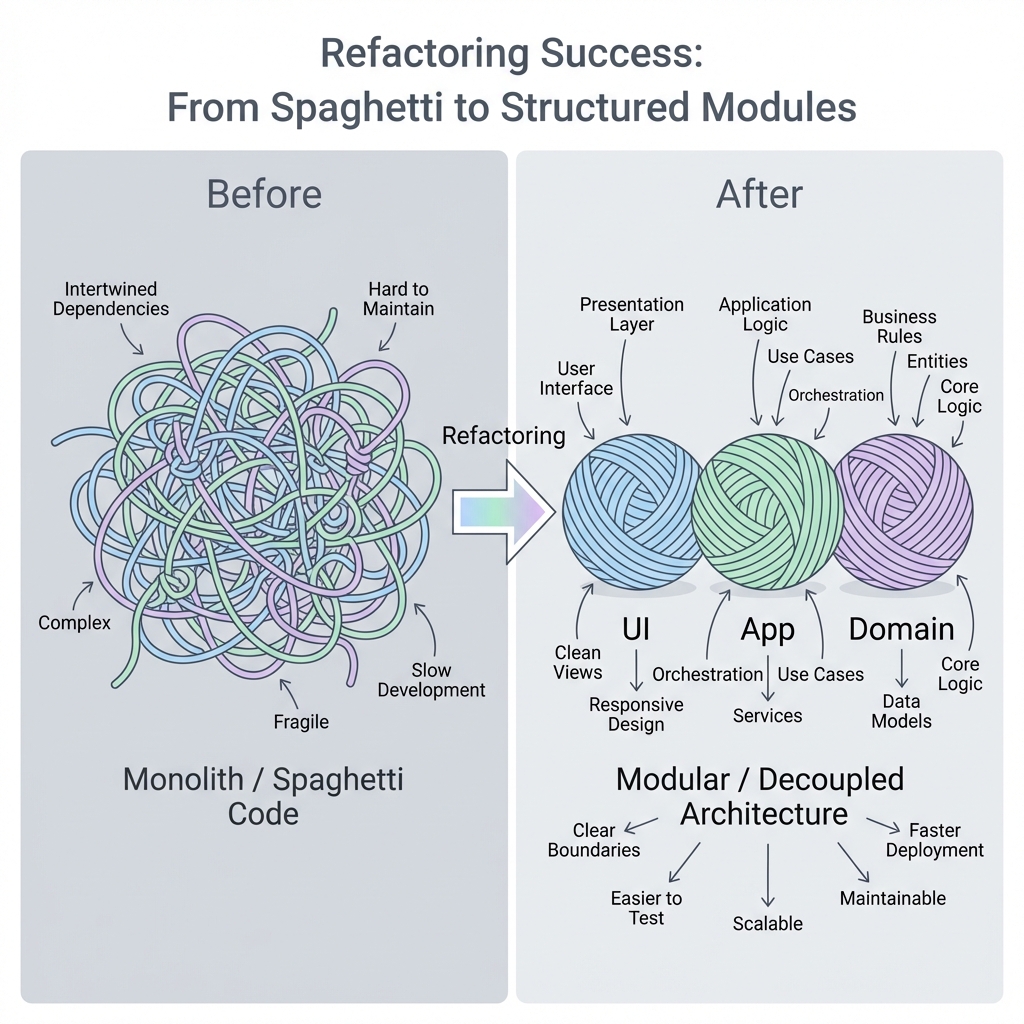
3. Before:UIに全部入ってる😇(1ファイル地獄)
「ありがち〜!」ってなるやつを、あえて作るよ😂
// src/order.ts(Before:全部盛り😇)

type MenuKey = "coffee" | "latte" | "cake";

const PRICES: Record<MenuKey, number> = {
  coffee: 480,
  latte: 550,
  cake: 620,
};

async function main() {
  // UI(入力)っぽい
  const menu: MenuKey = (process.argv[2] as MenuKey) ?? "coffee";
  const qty = Number(process.argv[3] ?? "1");
  const coupon = process.argv[4] ?? "";

  // Domain(業務ルール)っぽい
  if (!PRICES[menu]) throw new Error("メニュー不正");
  if (!Number.isFinite(qty) || qty <= 0) throw new Error("数量不正");

  const subtotal = PRICES[menu] * qty;
  const tax = Math.round(subtotal * 0.1);
  let total = subtotal + tax;

  if (coupon === "STUDENT10") total = Math.round(total * 0.9);
  if (total < 1) throw new Error("0円注文はだめ");

  // 通信(副作用)っぽい
  const res = await fetch("https://example.com/orders", {
    method: "POST",
    headers: { "content-type": "application/json" },
    body: JSON.stringify({
      item: menu,
      qty,
      coupon,
      subtotal,
      tax,
      total,
      createdAt: new Date().toISOString(),
    }),
  });

  if (!res.ok) {
    const text = await res.text();
    throw new Error("API失敗: " + text);
  }

  const json = await res.json();
  console.log("注文OK🎉 orderId=", json.orderId, " total=", total);
}

main().catch((e) => {
  console.error("注文NG💥", e);
  process.exit(1);
});
どこがツラい?😵💫💥
- 税率が変わる→UIファイルを触る😇
- APIの仕様が変わる→計算ロジックまで触る😇
- テストしたい→
fetchとDateとprocess.argvが邪魔😇 - 変更の理由が混ざりすぎて、修正が怖い🫠
4. Afterの完成形(先にゴールの地図)🗺️✨
この章のゴールはこの構造👇(第9章の3層を“実戦”でやるよ🍰)
src/
  domain/
    money.ts
    menu.ts
    pricing.ts
    order.ts
  app/
    placeOrder.ts
  infra/
    orderApiClient.ts
  ui/
    cli.ts
- domain/:税・割引・金額・注文のルール🛡️(純粋中心)
- app/:注文の流れ(入力→検証→計算→送信)🧭
- infra/:API通信など外界との接続🌐
- ui/:入出力(表示と入力だけ)🖥️⌨️
5. 段階リファクタ手順(止めずに直す)🔧🌱
ここからが本番!✨ いきなり全部移動しないで、小さく安全にいくよ🫶
Step 1:まず“計算だけ”を抜き出す(最強の第一歩)🧼⚡
最初にやるのはコレ。 副作用がない純粋関数にすれば、テストが一気に簡単になるよ🧪🌸
// src/domain/pricing.ts
export type MenuKey = "coffee" | "latte" | "cake";

export const PRICES: Record<MenuKey, number> = {
  coffee: 480,
  latte: 550,
  cake: 620,
};

export type Coupon = "" | "STUDENT10";

export type PriceBreakdown = {
  subtotal: number;
  tax: number;
  total: number;
};

export function calcTotal(params: {
  item: MenuKey;
  qty: number;
  coupon: Coupon;
  taxRate: number; // 0.1
}): PriceBreakdown {
  const { item, qty, coupon, taxRate } = params;

  if (!PRICES[item]) throw new Error("メニュー不正");
  if (!Number.isFinite(qty) || qty <= 0) throw new Error("数量不正");

  const subtotal = PRICES[item] * qty;
  const tax = Math.round(subtotal * taxRate);
  let total = subtotal + tax;

  if (coupon === "STUDENT10") total = Math.round(total * 0.9);
  if (total < 1) throw new Error("0円注文はだめ");

  return { subtotal, tax, total };
}
👉 この時点で、Before側(1ファイル)から計算を呼ぶように差し替えれば、動作は変えずに前進できるよ🚶♀️✨
Step 2:入力(UI)を“ただの入力”に戻す🧋
次に、process.argv を読むのはUIの仕事にするよ🙂
UIは「集めて渡す」だけが理想🧺➡️📦
// src/ui/cli.ts
import { calcTotal, type Coupon, type MenuKey } from "../domain/pricing.js";
import { placeOrder } from "../app/placeOrder.js";
import { createOrderApiClient } from "../infra/orderApiClient.js";

function parseArgs(): { item: MenuKey; qty: number; coupon: Coupon } {
  const item = (process.argv[2] as MenuKey) ?? "coffee";
  const qty = Number(process.argv[3] ?? "1");
  const coupon = (process.argv[4] ?? "") as Coupon;
  return { item, qty, coupon };
}

async function main() {
  const input = parseArgs();

  // ここで依存を組み立てる(Composition Rootの超ミニ版🏗️)
  const api = createOrderApiClient("https://example.com");
  const result = await placeOrder({ input, taxRate: 0.1, api });

  console.log("注文OK🎉 orderId=", result.orderId, " total=", result.total);
}

main().catch((e) => {
  console.error("注文NG💥", e);
  process.exit(1);
});
Step 3:Application(流れ)を作る🧭✨
「注文する」っていうユースケースに“流れ”を寄せるよ🚰 ここが SoC の気持ちよさポイント🥰
// src/app/placeOrder.ts
import { calcTotal, type Coupon, type MenuKey } from "../domain/pricing.js";

export type PlaceOrderInput = {
  item: MenuKey;
  qty: number;
  coupon: Coupon;
};

export type PlaceOrderResult = {
  orderId: string;
  total: number;
};

export type OrderApi = {
  createOrder(dto: {
    item: string;
    qty: number;
    coupon: string;
    subtotal: number;
    tax: number;
    total: number;
    createdAt: string;
  }): Promise<{ orderId: string }>;
};

export async function placeOrder(params: {
  input: PlaceOrderInput;
  taxRate: number;
  api: OrderApi;
}): Promise<PlaceOrderResult> {
  const { input, taxRate, api } = params;

  // Domain計算は純粋関数に委譲🧼
  const breakdown = calcTotal({
    item: input.item,
    qty: input.qty,
    coupon: input.coupon,
    taxRate,
  });

  // 外部へ送る形(DTO)はここ(境界)で作る📦
  const dto = {
    item: input.item,
    qty: input.qty,
    coupon: input.coupon,
    subtotal: breakdown.subtotal,
    tax: breakdown.tax,
    total: breakdown.total,
    createdAt: new Date().toISOString(), // 副作用はApp側に寄せた🕒
  };

  const res = await api.createOrder(dto);

  return { orderId: res.orderId, total: breakdown.total };
}
ここが超大事💡
- Domain:計算とルールだけ
- App:それをどう使って注文を通すか(流れ)
- UI:入力/表示
- Infra:API叩く
Step 4:通信(Infra)を分離する🌐🔌
fetch を隔離!
「APIが変わったらここだけ直せる」状態にするよ🧷✨
// src/infra/orderApiClient.ts
import type { OrderApi } from "../app/placeOrder.js";

export function createOrderApiClient(baseUrl: string): OrderApi {
  return {
    async createOrder(dto) {
      const res = await fetch(`${baseUrl}/orders`, {
        method: "POST",
        headers: { "content-type": "application/json" },
        body: JSON.stringify(dto),
      });

      if (!res.ok) {
        const text = await res.text();
        throw new Error("API失敗: " + text);
      }

      const json = (await res.json()) as { orderId: string };
      return { orderId: json.orderId };
    },
  };
}
6. “分離できた!”のチェックポイント✅✨
✅ 変更が来た時、どこが壊れる?
- 税率が 10%→8%:
domain/pricing.ts(または呼び出し側の taxRate)だけ🎯 - UIをCLI→Webに変更:
ui/だけ🖥️➡️🌐 - APIのURLやレスポンスが変わる:
infra/だけ🌐 - クーポンが増える:基本
domain/だけ🎟️✨
「変更理由ごとに場所が分かれる」=SoCが効いてる証拠だよ〜🧠🧩✨
7. リファクタを安全にする“最低限テスト”🧪🌸
ここは第15章の復習っぽいけど、ケーススタディでは超重要⚠️
まずは純粋関数 calcTotal だけテストすればOK🙆♀️
// src/domain/pricing.test.ts
import { describe, it, expect } from "vitest";
import { calcTotal } from "./pricing.js";

describe("calcTotal", () => {
  it("coffee x2, tax10% -> subtotal 960, tax 96, total 1056", () => {
    const r = calcTotal({ item: "coffee", qty: 2, coupon: "", taxRate: 0.1 });
    expect(r).toEqual({ subtotal: 960, tax: 96, total: 1056 });
  });

  it("STUDENT10 applies 10% off after tax", () => {
    const r = calcTotal({ item: "latte", qty: 1, coupon: "STUDENT10", taxRate: 0.1 });
    // subtotal 550, tax 55 => 605, then 10% off => 544.5 -> round 545
    expect(r.total).toBe(545);
  });
});
ちなみに Vitest は v4.0 系で Browser Mode の安定化なども進んでるよ🧪🌐(規模が大きくなったら活躍!) (Vitest)
8. AI(Copilot/Codex等)に手伝わせる“ちょうどいい頼み方”🤖🧡
この章はケーススタディだから、リファクタの瞬間に使える依頼文を置いておくね🎁✨ (貼るだけでOK系)
あなたはTypeScriptの設計コーチです。
次のコードを、UI / Application / Domain / Infra に分離する提案を3案ください。
各案について「メリット・デメリット」「移行手順(小さなステップ)」を箇条書きで出してください。
calcTotal の仕様(税10%、STUDENT10は税後に10%引き、四捨五入)を壊さないように
Vitestのテストケースを追加で10個提案して。境界値(qty=1、端数、0円防止)を多めに。
9. ありがちミス集(先に潰す)🪤😇
- Domainに
fetchやDateを入れちゃう → テストしにくくなるので、外へ追い出そ🧼 - DTOとDomainをごっちゃ → API都合の名前や単位をDomainに入れない📦🙅♀️
- UIが計算を持ち始める → UIは“入力と表示”。迷ったらDomainへ🧠✨
10. ミニ演習(手を動かす)✍️💖
演習A:クーポン追加🎟️
HAPPY50:合計から50円引き(ただし最低1円) どこを直す?(正解:まずdomain/pricing.ts+ テスト🧪)
演習B:APIの仕様変更🌐
createdAtが不要になった どこを直す?(正解:app/placeOrder.tsかinfra/のDTO生成まわり)
演習C:UIをWebにしたい🖥️➡️🌐
- 入力フォームにしたい
どこを触る?(正解:
ui/だけで済むのが理想👏)
まとめ 🎀✨
この章のコツはこれだけ!
- 計算(純粋)を抜く🧼
- 流れ(ユースケース)を作る🧭
- 通信(副作用)を隔離🌐
- UIは入力と表示だけ🖥️
次の第17章では、この分離を**AI導入前提で“崩さず運用する”**コツ(レビュー観点・ルール化)をガッツリやるよ🤖✅💖